November 21, 2026
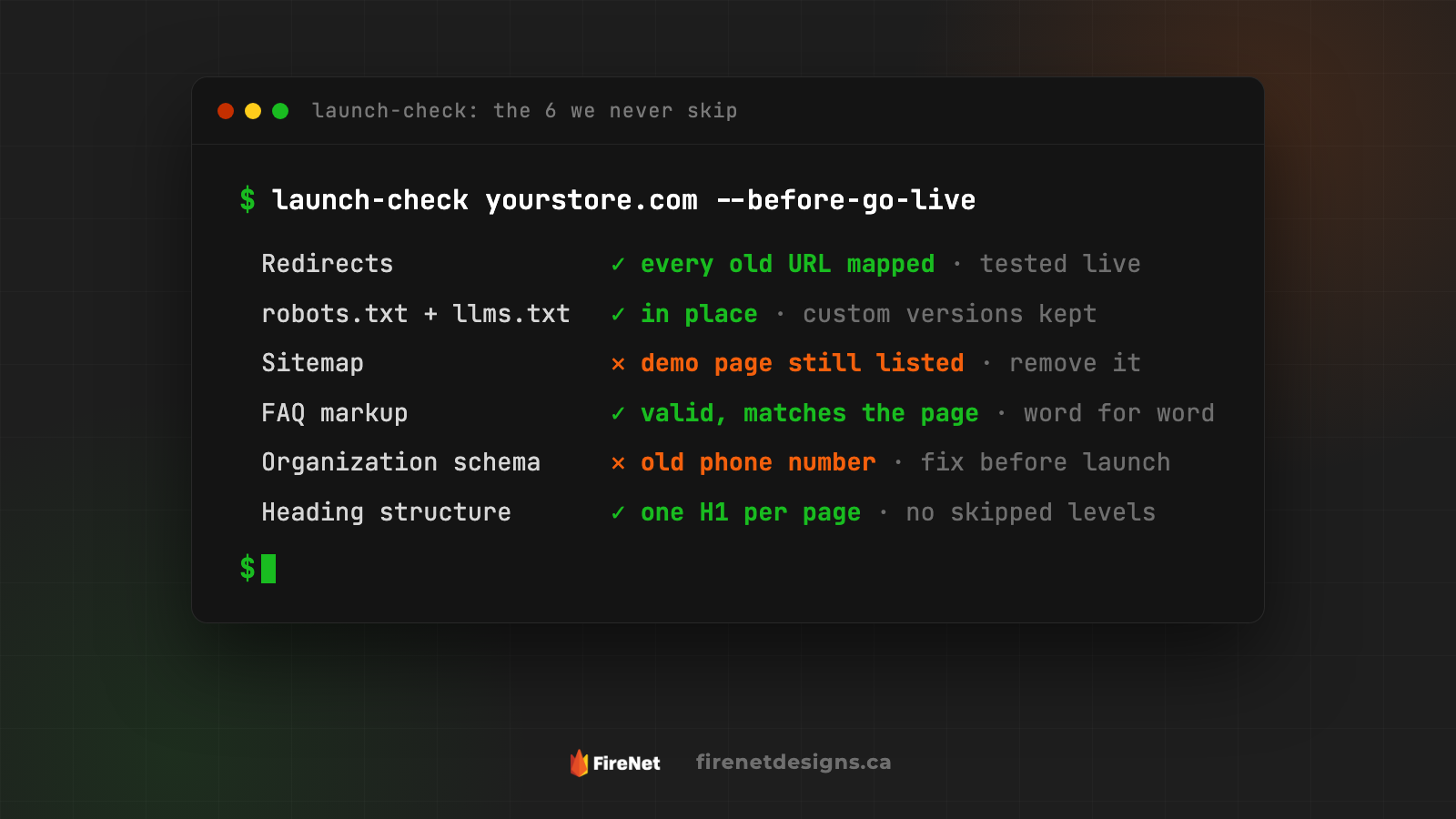
By launch day, everyone has looked at the homepage a hundred times. The fonts are right, the photos are right, and the colours are signed off. Then the site goes live, and the trouble shows up somewhere nobody was looking: a redirect nobody mapped, a form that still emails an old inbox, a tracking tag left on the staging address.
Launches rarely go wrong on design. They go wrong on the jobs nobody owns, and that's why we run a checklist. FireNet builds and launches Shopify and Webflow sites, and every site we build gets the same 20 checks, before it goes live and in the weeks after. Six of them I never let a launch skip. Those six are this post: what each one does, what goes wrong without it, and what changed in 2026.
This post leaves out the click paths. Where a setting lives depends on the platform, and a few of these have traps that only show up on one of them. Those, the other 14 checks and what to watch in the weeks after launch are in the free PDF.
One thing changes how much of this applies to you. If you're moving to a new platform or a new domain, like WordPress or Wix to Shopify, Shopify to Webflow, or a new web address, all six apply and the first one matters most. If you're relaunching on the same platform, like a new Shopify theme on the same store or a redesign inside the same Webflow site, your page addresses usually stay the same. Redirects then only matter for the pages whose address changes. The other five still apply, and a new Shopify theme can undo some of them.
Every page on your old site has history with Google. Other sites link to it, and it shows up for searches. When you rebuild or move a site, the addresses usually change. If nobody tells Google where each page went, that history doesn't come with it. The old address returns a 404, and the links pointing at it lead nowhere.
A 301 redirect is how you tell Google. It says this page moved for good, and here's where it lives now. You want one per old URL, each pointing at the closest new page.
The mistake I see most is the shortcut: send every old page to the homepage and call it done. Someone who searched for one product and lands on your homepage has to start looking all over again. Send a page to the homepage only when nothing closer exists.
The other mistake is building the list from the menu. The menu only shows some of the URLs Google knows about. Old blog posts, discontinued products and landing pages from a campaign two years ago all have addresses too, and you want every one of them on the list.
Both platforms have a catch. On Shopify, a redirect only works for an address that no longer has a live page. On Webflow, importing a redirect file replaces every redirect already there. The PDF has where each setting lives and how to work around both. If the domain itself is changing, there's one more step in Google Search Console once the redirects are live, and that's in there too.
Staying on the same platform? A new Shopify theme keeps your product, collection and page addresses, because those belong to the store, not the theme. A redesign inside the same Webflow site keeps its page addresses too. You only need redirects for the pages whose address changes: a renamed handle or slug, or a page you removed or merged.
These are two small text files at the root of your site, and they do different jobs.
It's the right tool for keeping crawlers out of pages that add nothing in search, like template, filter and parameter pages.
Where people go wrong is using it to hide a page. A page blocked in robots.txt can still show up in Google from links pointing at it. If you want a page out of Google, that's the job of noindex.
On Shopify, most stores need no change. The default file already keeps crawlers out of the cart, checkout and account pages, among others. You can edit it, but Shopify calls that an unsupported customization and warns that a mistake can cost you your search traffic. I'd only touch it with a clear reason. If you do edit it, the edit lives in your theme, so a new theme can drop it. The same goes for a custom llms.txt.
llms.txt is newer. It's a short Markdown file that sums up your site and links to your key pages, proposed in September 2024 as a guide for AI tools.
This year it went from a niche idea to a built-in feature. Since May 28, 2026, every Shopify store serves a default llms.txt. Webflow added an llms.txt upload to its SEO settings, though Webflow itself calls llms.txt experimental.
Google, for its part, says it doesn't matter for Search. Its guide to AI search, published in May 2026, says you don't need AI text files to appear in Google Search, and that adding them "will neither harm nor help" your visibility. No major search engine or AI company has said it relies on one.
So why do we add it? It takes ten minutes. I'd rather the file say what we want it to say than leave a default in place that nobody has read. Just don't let anyone sell you llms.txt as a ranking trick.
Your sitemap is the list of pages you're asking search engines to take seriously. Shopify and Webflow both build it for you, which is handy until you remember that it lists what's published, and a build collects junk along the way.
A style guide page the designer worked from. Template pages. A test page from when the form was being wired up. Leftover demo content. If those are live, they can end up in the sitemap, and then you're asking Google to treat them like your real pages.
They should be deleted, or set to noindex and taken out of the sitemap. Each platform does that page by page in its own way, and the PDF has both, plus the two-minute check that catches the demo page everyone forgot.
FAQ schema, or FAQPage markup, labels the questions and answers on a page so software can read them. For years it sat on most SEO checklists because it earned those expandable answers under your result in Google.
That's over. Google limited FAQ rich results to government and health sites in 2023, then stopped showing them for everyone on May 7, 2026. In June it took FAQ support out of Search Console and the Rich Results Test. Google also says its AI search features don't need any special markup.
If a checklist still tells you to add FAQ schema to win more space in search results, it was written before May 2026.
We still keep it on pages that show FAQs. Leaving the markup in place does no harm, and it still labels your questions and answers for software that reads them. We hold it to one rule: if it's there, it has to be right. The markup has to match the visible questions and answers word for word. Markup that says something the page doesn't say is a problem.
Where it usually goes wrong is later. Someone edits an answer on the page, and the markup still carries the old wording. No validator catches that, because the markup is still valid. It's just wrong. And since the Rich Results Test no longer checks FAQ markup at all, the tool most older guides point you to won't flag broken markup either. The PDF names the validator we use instead.
Organization or LocalBusiness markup tells search engines who's behind the site: your business name, address, phone number, hours, logo and social profiles. Nobody sees it on the page. It sits in the code and answers "who is this?" for anything that reads it.
The rule that matters most is matching it to your Google Business Profile exactly. Same business name, same address format, same phone number. If your markup has the old phone number and your Business Profile has the new one, you're giving Google two answers to the same question.
It also has to be valid. An error in this markup is easy to miss, because nothing on the page looks wrong. The PDF has the fields a local business needs at a minimum, the ones worth adding, and the two free tools we test it in.
Each page gets one H1. Sections get H2s, the parts under them get H3s, and no level gets skipped. Headings are how screen readers and search engines read the outline of a page. A page with three H1s, or an H3 sitting straight under the H1, reads like a book with its chapters out of order.
This one slips in during a build, because headings get picked for how big they look instead of where they sit in the outline. A banner needs a big line of text, so it becomes an H1, and now the page has two. On screen it looks fine, so nobody notices.
It's also the easiest of the six to fix once you can see it. The PDF has the free way we check every template's outline.
Those are the six I never let a launch skip. The 2027 Website Launch Checklist is a free PDF with all 20 checks, written by the developers who run them. For the six above, it has the Shopify and Webflow settings where the two differ, and the check we run to confirm each one, on staging and again once the site is live.
The rest of the list catches the quiet problems. None of them are glamorous, and every one of them has broken a launch somewhere. A few of the things it guards against:
The PDF also covers the weeks after launch, because some problems only show up once real visitors and Google arrive. And it's built to be ticked twice: once on the staging site, and again once the site is live on its real domain. The second pass is the one that catches the surprises.
A launch isn't done when the site goes live. It's done when the old site's traffic has found its way to the new one. Most of that work happens before the domain switches, which is why the checklist exists.
If you're launching or moving a Shopify or Webflow site, get the list in front of you before launch day, while there's still time to fix what it finds. It's free, and it's the same list we run on the sites we build.

FireNet Designs is a verified Shopify Partner, featured in the official Partner Directory. Since 2022, we’ve delivered lightning-fast Shopify design, development, SEO, app builds, and more: 4x faster, at half the cost. No fluff, no middlemen, just results. The Anti-Agency for brands that want growth, not delays.

Get expert eyes on your storefront
© FireNet Designs Inc.


